Pricing & Tariff Setting
Pricing and Tariff Setting: How to Price Your AI Expert and What to Offer Clients
Getting your pricing and tariffs right is key to the profitability and sustainability of your AI product. Your pricing should reflect the high value your AI Expert brings to clients, while covering the real operating costs of AI reports and generating a profit. Remember, you are not creating just another chatbot, but a sophisticated "AI being" or "digital colleague" that has the potential to become an invaluable partner for your clients.
Understand the Factors Affecting Your Cost and Pricing Options
Before you set a price, it is important to understand what influences your operating costs:
A) The AI Model (Level of "Intelligence") Chosen for Your Instance
Every BuddyPro instance runs on the SMART model, which directly affects the quality of your AI Expert's responses and your costs.
- 🧠 The "SMART" model: uses the most advanced language models available (e.g. models from companies like Anthropic). It provides the highest quality, deepest and most "human" conversations and powers every BuddyPro instance to deliver the best user experience.
- Approximate cost per every message in conversation (user message and Buddy message both count separately): Approx. 0.08 USD (typically in the range 0.06–0.12 USD, depending on the length and complexity of the conversation. In exceptional cases, especially with a low number of users and long voice messages, the cost can be higher).
All AI costs and prices per message listed in this documentation are stated excluding VAT.
The SMART model powers your entire instance and all of its tariffs.
B) Set Monthly Message Limit for the User
For each tariff you define how many messages will be available to the user within their monthly subscription.
- 💬 Messages in both directions count: that is, both messages sent by the user and replies from your AI Expert. For example, if the plan includes 1000 messages, this could be 500 questions from the user and 500 replies from the AI.
- 🤖 AI-initiated messages also count: if your AI Expert addresses the user himself (e.g. with a reminder or a proactive query, if you have this feature enabled), these messages also count towards the limit.
- 📊 Common limits can be e.g. 300, 500, 1000, or even more messages per month, depending on the expected usage intensity.
- 📈 Practical experience: most users usually do not use up their full monthly message limit (on average when using a limit of 1000 messages, they usually use only 30-50%). This is a good thing to take into account when calculating your average cost per user -- it is usually not as high as the theoretical maximum would suggest.
C) Length and Complexity of Your System Prompt
The System Prompt is the basic instruction for your AI Expert. If it is extremely long and complex (e.g., dozens of pages), it would be sent with every user query and may increase the cost of each individual message. Try to keep System Prompt as efficient as possible and keep key know-how in the sources folder.
D) Conversation History (Long-Term Memory)
Your AI Expert remembers previous conversations with the user. The longer the user interacts with the AI, the more context the AI has and the richer the user profile. Processing more context can be slightly more expensive. Thus, a new user usually has cheaper first messages than a long-term user with a rich history.
E) Additional Costs for Advanced AI Features
Beyond the per-message AI cost, your instance may incur additional costs if you enable advanced features. These consume AI credits separately:
-
🎤 Voice messages (Text-to-Speech): When your AI Expert responds with a voice message instead of text, the cost depends on the length of the generated audio:
Voice length Approx. cost 1 minute ~$0.072 2 minutes ~$0.074 5 minutes ~$0.083 20 minutes ~$0.15 -
🎙️ Voice Clone: You can create a custom voice clone that imitates your voice (see
/createVoiceClonecommand). Using a voice clone is approximately 2× more expensive than using the standard voices. The multiplier applies to the voice message costs above. -
🧘 Voice with Music (meditations): If you enable voice messages with background music (
/enableVoiceWithMusicGeneration), generating each such message typically costs 2–6× more than a standard text response, while still counting as only 1 message for the user. This feature currently works only with a voice clone. We recommend limiting meditations to max 1 per day per user. -
🎨 AI-generated images: Your AI Expert can generate and edit images during conversations. Approximate cost per image: ~$0.03 – $0.15. The final cost depends on the selected model, resolution, style, and complexity.
Your total operating cost as an instance owner consists of:
- Per-message AI cost — approximately $0.06–$0.12 per message — see A) above
- Voice messages — approximately $0.07–$0.15 per voice message
- Voice Clone (if enabled) — approximately 2× higher voice message cost
- Voice with Music (if enabled) — typically 2–6× higher cost per voice message with music
- AI-generated images — approximately $0.03–$0.15 per image
TIP: How to find out your exact costs and statistics:
You can now use the /stats command as an owner or team member. This will show you a summary report containing:
- Total AI costs (including training costs).
- Average cost per report in your instance.
- The current status of AI credits.
- Statistics for the last week and month (number of messages and cost).
- Total revenue from linked payment systems (FAPI/Stripe).
You can also roughly calculate how many messages does an average subscriber use up per week/month by dividing the number of total messages in the (completed) week/month by the number of subscribers.
This way, you no longer have to rely on estimates, but can see real data about your instance's profitability.
Sales Overview in the Dashboard
The Dashboard's Sales Overview page gives you a real-time view of your sales performance and transactions from linked payment systems (Stripe or FAPI).
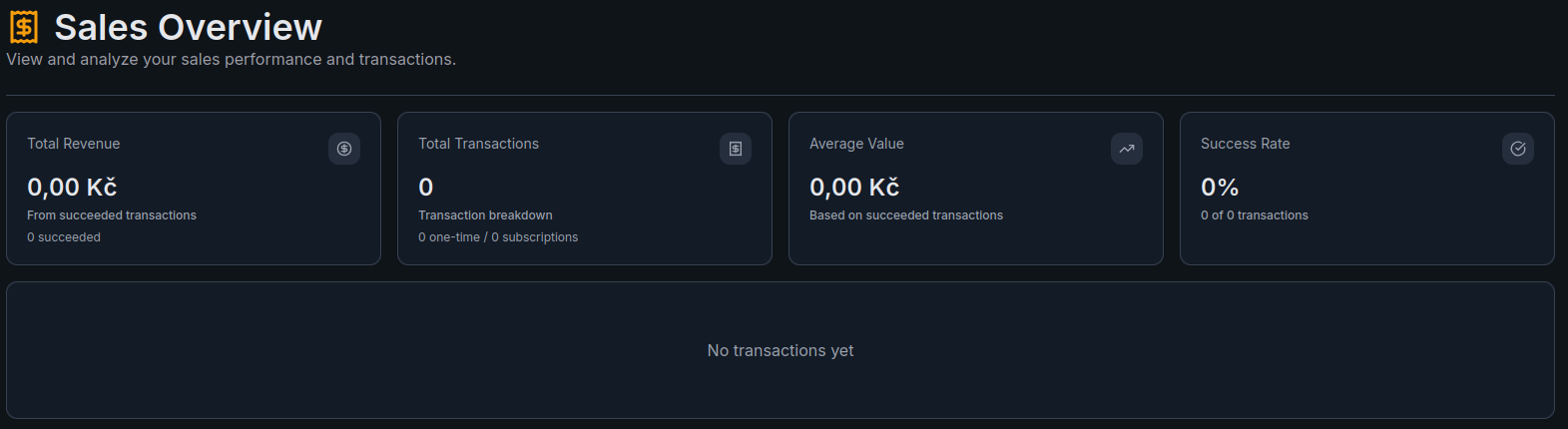
The page displays four key metrics:
- Total Revenue — total amount from succeeded transactions
- Total Transactions — count with breakdown (one-time / subscriptions)
- Average Value — average transaction value based on succeeded transactions
- Success Rate — percentage of successful transactions out of total
Below the stats, a transaction list shows individual payments with details. When no transactions have been processed yet, it displays "No transactions yet."
How to Determine Selling Price and Margin -- Examples and Recommendations
Your price should reflect the high value your AI Expert brings, while covering your costs and generating a profit.
- 💎 Positioning as a premium product: Don't be afraid to market your AI Expert as a premium service. Compare its value to the price of your in-person consultations, extensive online courses, or other expert products. For example, Pavel Riha successfully sells Online AI Strategist (built on the SMART model) for $140 per month.
- 📅 Consider offering longer plans (six months, a year) at a discounted price at the beginning. You can add monthly options later. This approach can help gain a core of loyal customers.
- 📊 Example sales price and margin calculation with 40-70% usage of the limit (for inspiration, adjust according to your situation and the AI model you choose)
- 🎁 Discounts for longer subscriptions: Motivate clients to make a longer commitment by offering a discount when purchasing an annual or half-yearly plan.
Create Different Tariffs (If You Want to Offer More Options)
You can choose to offer one main tariff, or create multiple subscription tiers that can vary in, for example:
- Monthly message limit (e.g. 300, 500, 1000 messages).
- Subscription length (monthly, quarterly, annual).
- Possible bonuses (e.g. access to an exclusive community, additional materials, priority support).
For each such plan, you will need to create a separate product and sales form in your payment system (FAPI or Stripe), and then link this individually to your BuddyPro instance (see point 19).
Extra Message Packages (A Necessary Addition to Your Offer!)
Your clients may occasionally exhaust their monthly message limit before renewing their subscription. For these situations, it is absolutely crucial to have the option of purchasing one-time extra message packages ready. Your AI Expert can automatically offer them this option.
- 🔄 How extra message packages work
- 💲 Package pricing: the price per message in the package being purchased may be slightly higher than the prorated price per message in the monthly plan. This encourages clients to stay on the regular subscription, which is more convenient for them.
- ⚙️ Implementation: you must also create a separate product and sales form for each extra message package in your payment system and link it to BuddyPro as a package type (see section 19.1.C).
Important Command to Inform Your AI About the Base Price (For Communication with Users)
In order for your AI Expert to correctly inform the user about the subscription price (for example, when their trial is about to end or when they ask about the price directly), you need to "communicate" this information to them. The following command is used to do this, which is entered by you as the owner into a chat with your BuddyPro instance:
/setDefaultCost:{defaultCost}:{defaultCostCurrency}:{defaultCostPeriod}:{defaultCostPeriodCount}:{discountedCost}
{defaultCost}: Your standard (non-discounted) price for the base subscription period.{defaultCostCurrency}: Currency code (e.g. CZK, EUR, USD).{defaultCostPeriod}: The unit of the period. Allowed values are: days, weeks, months, years.{defaultCostPeriodCount}: The number of units of the period (e.g. 1 for "monthly"; if you wanted to communicate e.g. "in 2 months", you would specify 2 and the period months).{discountedCost}: Optional parameter. If you specify it, your AI Expert will communicate that the default price is{defaultCost}, but that a temporary discount is currently available at{discountedCost}. If you do not offer a discount or do not want to communicate it in this way, simply omit this parameter (the command will end after{defaultCostPeriodCount}).
Examples of use:
- Example 1 (no discount, monthly payment):
/setDefaultCost:2990:CZK:months:1 - Example 2 (with discount, monthly payment):
/setDefaultCost:3490:CZK:months:1:2990
Important: This command does not affect the actual prices set in your payment system (FAPI/Stripe). It only serves to allow your AI instance to properly communicate basic pricing information to your users.
Frequently Asked Questions (FAQ)
How many messages do users consume on average out of their monthly limit?
Experience shows that most users consume approximately 30-50% of their monthly limit of 1000 messages. The percentage can be higher at lower limits.
Do unused messages from the monthly limit carry over to the next month?
No, messages from the regular monthly limit (within the subscription) are not carried over at the end of the billing period. Each month the limit is reset to the original value.
The exception to this is messages from purchased extra packages -- these do not expire and carry over until they are completely used up.
What is the difference in cost per message for a new user versus a long-term user?
Costs are a bit lower for a brand new user because the AI doesn't need to process the user's extensive conversation history and context. For a long-term user with a rich history, the cost is slightly higher due to the need to search and use the accumulated context. In the long term, this will average to the costs specified in the pricing section above.
What if a client uses up their monthly message limit?
Your AI Expert will automatically notify them when the limit is reached.
It will then offer them the option to purchase a one-time package of extra messages or upgrade to a higher plan (if you offer such options and have them linked). To do this, it redirects them to the URL you set with /setUpgradeSubscriptionUrl:{url}.
The user can ask your AI Expert at any time for the number of currently available/exhausted messages and it will tell them the current status.
How exactly are messages counted within the monthly limit?
The limit includes two-way communication: that is, both messages sent by the user and replies from your AI Expert are counted towards the limit.
Messages that your AI Expert initiates itself (e.g. automatic greetings, reminders, proactive queries) are also counted in the limit if you have this feature enabled (/shouldInitiateMessages:true). However, the user can tell their instance not to write to them by itself, which will limit these initiated messages.