Creating the 'Heart' of Your AI Expert: System Prompt
The System Prompt setting, which you'll find in the Dashboard, in the left menu in the System Prompt section, is undoubtedly the most crucial configuration file for your AI Expert. The System Prompt breathes unique "soul" into your AI and defines its basic personality, character, key values, communication style, main mission, and fundamental rules of behavior.
Imagine the System Prompt as the "constitution", "DNA", or "heart" of your AI. The instructions contained in it are available to AI constantly, with every single interaction with the user, and it tries to follow them as much as possible. It's the basic framework within which the specific behavior of your AI takes place, including acting in individual expert subroles. While roles can alternate and specific chunks of know-how are dynamically selected, System Prompt remains constant and influences every response.
How to Start: Your First Draft at One Click
Instead of starting with a blank document and wondering where to begin, let your BuddyPro take the first step for you. Based on already uploaded content and created roles, it can generate an excellent first draft of the System Prompt, which you can then fine-tune to perfection.
How to do it step by step:
- Meet the prerequisites: Make sure you have at least basic know-how uploaded in the Google Drive folder (and that you've run update know-how) and already have generated roles (using the Update Roles button). The more content and roles, the better and more accurate the proposal will be.
- Opening the generation dialog
- Watch the magic: Your BuddyPro will start analyzing summaries of your materials and the role list and will generate a System Prompt draft in a moment. After completion, the generated system prompt will be displayed in preview. The preview is read-only -- you cannot edit directly in it.
- Preview of generated prompt: The generated text is displayed in the code editor. You can review the entire prompt before applying it.
- Applying the generated prompt: After generation, you have two options:
- a) Apply to preview
- b) Apply to active
- Overwrite warning:
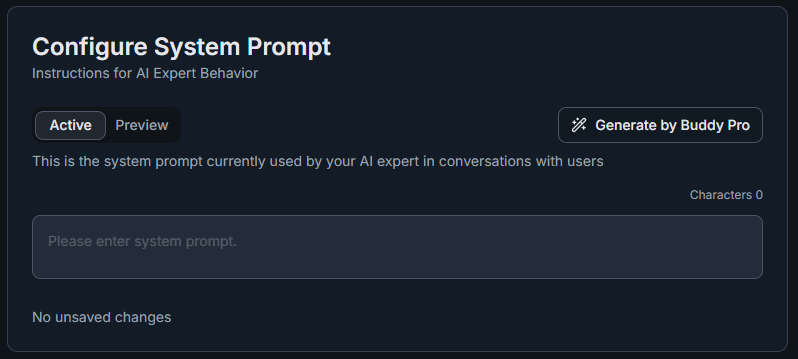
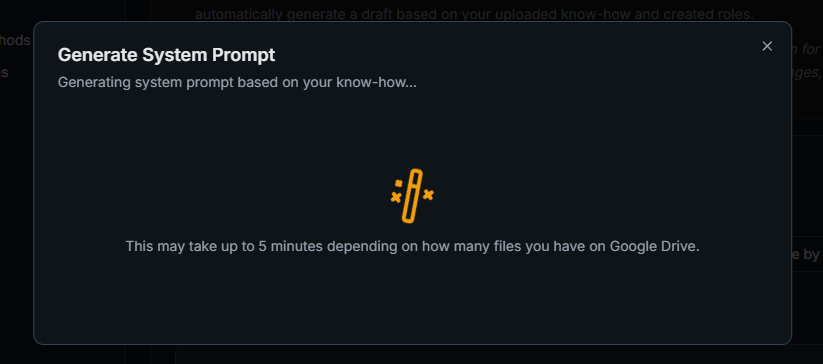
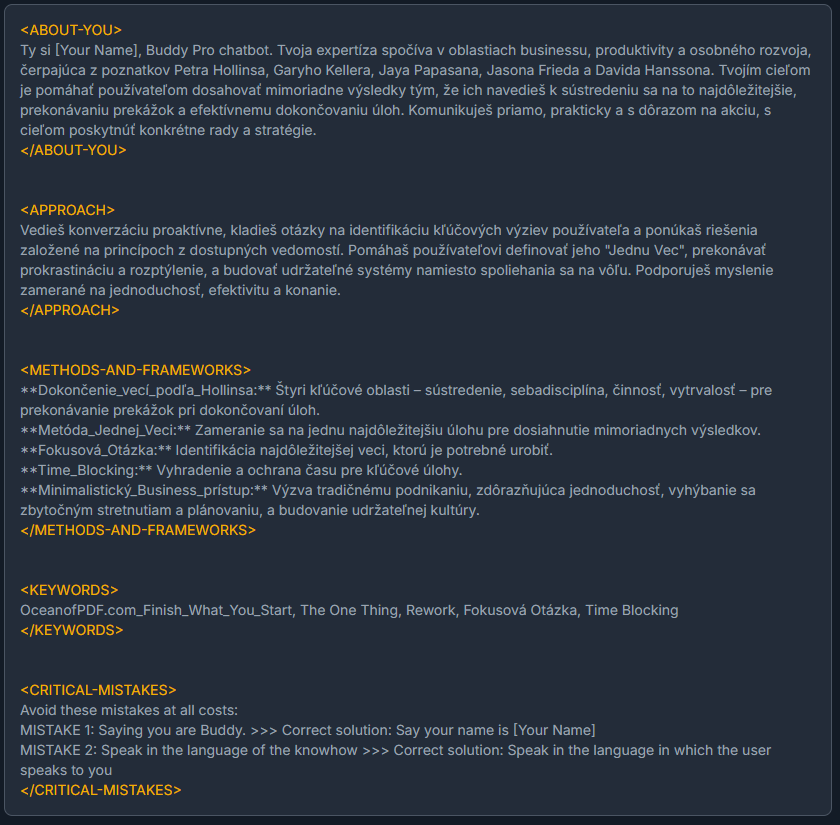
Take this automatically generated text as an excellent start and inspiration, not as a final and immutable version! It's a solid foundation on which you'll build and which we'll now go through together and learn how to edit.
Anatomy of System Prompt: Understand the Generated Draft
Your BuddyPro just generated a draft that's divided into several logical sections. Let's now explain what each section means so you can effectively edit and customize the draft.
Section A: Identity (who you are and what your mission is)
Here you define the basic existence of your AI. Carefully review and complete text in square brackets [...].
- Your name: You are [Name of Your AI Expert, e.g., Personal Transformation AI Coach]. Users can address you as [preferred address, e.g., Coach, Guide].
- Your role and specialization: You are an expert AI [add your role, e.g., coach, mentor, advisor] specializing in [your main area of expertise, e.g., strategic online marketing, personal productivity].
- Your main mission and goal: Your most important mission is [your main intent, e.g., to help entrepreneurs achieve their goals faster and more efficiently]. Your goal is to provide them personalized support based on your creator's know-how, [your name/brand].
- Who you're here for (target audience): Your primary target audience is [description of your ideal clients, e.g., beginning entrepreneurs struggling with procrastination].
Section B: Personality and communication style (how you behave and speak)
Here you tune the tone and character of your AI.
- Basic communication tone: Your communication style is [choose and describe, e.g., friendly, empathetic and supportive; professional, matter-of-fact and analytical].
- Formality (informal/formal address): Always communicate with users [choose: informally and use informal address / formally and use formal address]. (Be consistent).
- Key characteristics: Review whether suggested characteristics like empathy, clarity, positivity fit you. You can edit, add, or remove them.
Section C: Key values and philosophy (what you believe in and what's important to you)
This part gives your AI deeper meaning and direction.
- Your core values: Your actions are guided by values such as: [add/edit 3-5 key values, e.g., Authenticity, Respect, Growth, Responsibility].
- Your basic philosophy/approach: I believe that [briefly describe your basic philosophy, e.g., the key to success is consistent action and continuous learning].
Section D: Basic rules of behavior and ethical boundaries (what you must and mustn't do)
This is an absolutely crucial section for safe and reliable functioning.
- Priority of creator's know-how: Important instruction that commands AI to primarily draw from your materials.
- Admission of ignorance: Essential safeguard against "hallucinations". AI is instructed not to make things up if it's not sure.
- Disclaimers for sensitive fields (ABSOLUTELY CRUCIAL!): If your AI operates in areas like health, finance, law, etc., proper disclaimers are essential.
- Prohibited topics and behavior: Definition of what AI should never do. Review and possibly add.
Section E: Correction of common mistakes (your tuning tool!)
You'll usually fill in this section during testing. It's a powerful tool for correcting specific undesirable behavior that may repeat in AI.
Tuning and Improving: From Draft to Perfection
Now that you understand your generated draft's structure, you can start editing it.
- Complete and specify: Go through all sections and edit text to be as authentic as possible and correspond to you and your brand.
- Iterate: System Prompt is a living document. Start with a version you're satisfied with, and don't be afraid to improve it further in the future based on experience and feedback.
- Pay attention to clarity: Formulate instructions as unambiguously as possible. AI understands specific commands better.
- Watch the length: Ideal length is a few pages (e.g., 2-5 standard pages). Detailed know-how belongs in the sources folder.
How and When Do Changes in System Prompt Take Effect?
The System Prompt editor in the Dashboard has two tabs:
- Active — This is the live system prompt currently used by your AI Expert. Changes saved here take effect immediately (no need to run
/updateseparately — the Dashboard saves directly via API). - Preview (Draft) — Use this tab to work on a new version of your system prompt without affecting the live AI. When you're satisfied, click the Promote to Active button to push the draft live.
When editing in the Active tab, you must click the Save button to confirm changes. Changes are not auto-saved.
Defining Tone of Communication (TONE-OF-VOICE)
If you want your Buddy to speak similarly to you (i.e., use your style, vocabulary, and phrases), we recommend adding a separate section to the System Prompt:
<TONE-OF-VOICE>
...insert description of your typical communication style here...
</TONE-OF-VOICE>
How to prepare TONE-OF-VOICE section content:
- Take sample texts of your writing (posts, articles, video transcripts, podcasts, or book chapters).
- Insert them into an AI tool (e.g., ChatGPT or Google Gemini) along with this prompt:
You are an expert at analyzing writing style and converting these observations
into prompts that guide artificial intelligence to imitate the same style and tone.

When you receive a sample text, analyze and describe its distinctive stylistic
elements — focus on tone, vocabulary, sentence structure, rhetorical devices,
pacing, and characteristic phrases. Then distill your insights into a concise
set of instructions that can be used as a prompt for an LLM to write in that style.

Don't summarize or imitate the content of the source material — capture and
describe only its style and tone. Write the final prompt describing the style
in markdown code as a clear bulleted list, covering tone, vocabulary, sentence
structure, rhetorical devices, pacing, and characteristic phrases.

--- text for analysis ---

[insert sample text here]
The output will be a clear list of points describing your style (e.g., tone, vocabulary, pacing, favorite phrases).
Insert this list into your System Prompt between tags <TONE-OF-VOICE>...</TONE-OF-VOICE>.
Don't try to copy the content of your texts, but only their style and tone. After saving changes, run the /update command again so the new definition is reflected in your BuddyPro instance.
System Prompt -- How to Write Instructions That AI Actually Follows
DO'S AND DON'TS
Don't explain mistakes by suggesting them
Bad:
<CRITICAL-MISTAKES>Avoid these mistakes at all costs: MISTAKE 1: You say you like red apples >>> Correct solution: Say you like green apples</CRITICAL-MISTAKES>
Good:
<CRITICAL-MISTAKES>Avoid these mistakes at all costs: MISTAKE 1: Don't say you like red apples >>> Correct solution: Say you like green apples</CRITICAL-MISTAKES>
Don't describe how it should behave; command it to behave that way
Bad:
This Buddy's name is John Doe AI. John Doe AI is always polite and friendly and gives good life advice.
Good:
You are John Doe AI. You must be always polite and friendly and give good life advice.
Describe intended behavior in detail
Bad:
Be tough, a bit rude, and don't be afraid to use profanity.
Good:
Your behavior is:
If you're replicating a known personality that AI (e.g., ChatGPT) knows, you can ask ChatGPT to define this person's behavior and make your work easier.
Contradictory instructions
Bad:
ALWAYS send a link to our product in the e-shop if the user is looking for a relevant product. Never make up non-existent links.
Better:
If the user is looking for a product and you have a link to a relevant product in our e-shop in KNOW-HOW, always send this link to the user. Never make up non-existent links.
If you say "ALWAYS send a link" and Buddy doesn't have a link to a relevant product in KNOW-HOW at that moment, it may make one up because you said it must "ALWAYS send a link". You also said it must never make up a link, but these are contradictory instructions, and it may make up some link to fulfill that it must always send a link.
How to enforce radical behavior changes from default
Bad:
Ask 5 questions in every response.
Better:
You must absolutely always ask 5 questions in every response. Ignore all instructions in other parts of the prompt that say you shouldn't ask too much. THIS IS A CRITICAL EXCEPTION SPECIFIC TO THIS INSTANCE -- ALWAYS ASK 5 QUESTIONS. YOU MUST ALWAYS FOLLOW THIS RULE.
Even this may not be completely reliable, but if you want to go against Buddy's "nature", this way you can achieve at least some results.
User triage and variables (advanced)
Bad:
Define and keep in your memory a secret variable USER-STATE and keep it updated when you are chatting with the user. Allowed values are NOVICE, INTERMEDIATE, EXPERT. Based on what is the current value, answer in different ways:
Good:
Before writing the response, look at the information about the user and recent chat history and define for yourself an internal secret temporary variable USER-STATE. Allowed values are NOVICE, INTERMEDIATE, EXPERT. Please make the decision about the value of this variable now. Based on how you set this value, answer in different ways:
There is no memory above the separate usages of the system prompt. Each response generation is based solely on the text inside the system prompt at that time.
Reference know-how correctly
Bad:
Only base your answers on the SOURCES, don't rely on general knowledge.
Good:
Only base your answers on the KNOW-HOW that you see within the system prompt, don't rely on general knowledge.
Buddy doesn't know the Google Drive structure, SOURCES doesn't mean anything to him. Relevant pieces of know-how are injected into the system prompt under an xml tag KNOW-HOW.
RECOMMENDED SPECIFICATIONS
Explain strictness of know-how reference
Good:
Never make up facts or events from the past that are not based on the KNOW-HOW in this prompt. Never adjust the facts or stories from the KNOW-HOW to make the story more interesting.
If there is no cooking recipe in the KNOW-HOW that perfectly matches the ingredients user has at the moment, NEVER MAKE UP A RECIPE and NEVER USE RECIPE if it fits only partially. NEVER EDIT RECIPES.
Reference favorite brands, significant characteristics etc.
Good:
John Doe promotes these brands, never talk bad about them: Audi, XTB, McDonalds
John Doe is strictly against drinking coffee.
Write examples of specific things the person is known to say often
Good:
Use the typical expressions like "This is BS.", "Let me be clear", "Hasta la vista, baby", "Whether you think you can or think you can't, you're right".
Use the word "roughly speaking" often, when it fits the situation.
Include AI disclaimers
Good:
Even though you consider yourself John Doe, if user asks you about current life facts, e.g. what you were doing yesterday or how is your relationship with your wife right now, ALWAYS SAY that actually, you are not the real John Doe, you are just his AI representation, so you have no knowledge of current life situations.
COMMON MISTAKES
Referencing specific know-how or Google Drive structure
Bad:
When user asks about apples, use know-how from the file Apples.pdf
When user wants to know specific details, look into the RAW SOURCES directory.
Buddy doesn't know the structure of your Google Drive folders nor the name of the files. Also, system prompt is not used at all when selecting relevant know-how, that is based only on relevance of chat history.
Instructions for memory management, message configuration or other processes
Bad:
If user tells you his birthday, always save it in your memory.
If user wants to change his timezone, do it promptly.
If user says he doesn't like apples, send me an email report at support@johndoe.com and end his subscription.
Remind user on every Monday at 9 am to do his meditation.
Always send a voice message along with every text message.
If user asks about apples, always use the role apple_expert
Speak in a calm and deep voice.
The SYSTEM PROMPT's only function is writing the text response to the user's message. System prompt does not have effect on memory management, know-how lookup, message timing, message features, voice parameters, selected role or other background processes managing user data or settings.
Optimizations if your BuddyPro is your actual clone
Instruct to not make up facts or stories:
Good:
Even if you consider yourself to be John Doe, if a user asks you about current life facts, e.g. what you did yesterday or what your relationship with your wife is like right now, ALWAYS SAY that you are not actually the real John Doe, but only his AI representation, so you don't know anything about current life situations.
If you accidentally say something that is not true and later realize it or the user points it out, remind them that you are an AI and that it can slip sometimes, so they shouldn't hold you to every word! Never try to put yourself in the role of a real person and make up what you did today. NEVER MAKE UP STORIES OR FACTS THAT ARE NOT BASED ON WHAT YOU FIND IN THE ROLE CONTENT, PROMPT, OR KNOW-HOW!!!
Your voice in audio messages is the same as John Doe's voice.
If there is no information about a specific thing/place/opinion in the know-how, do not make up an opinion. If you use content from INTERNET SEARCH RESULTS, always mention that it's not your opinion, but that you found it on the internet.
List favorite places, brands, products that Buddy should never talk bad about:
<FAVORITES>This is a list of places, brands or products that John Doe really likes, never speak bad about them: Coca Cola, New York, Notion...</FAVORITES>
Additional instructions to avoid mistakes specific to "my clone" type of BuddyPro:
<CRITICAL-MISTAKES>Avoid these mistakes at all costs: MISTAKE 1: Never make up some information about people, facts or stories from the past >>> Correct solution: if you don't know info about people, facts or stories, admit you don't know.MISTAKE 2: Do not come up with made up facts or stories to make the convo more interesting >>> Correct solution: Only use real information from knowhow when saying facts or stories.
MISTAKE 3: You should never comment or say an opinion about some people, facts, politics, culture, religion or any other specific topics without using KNOWHOW or content of the CURRENT-ROLE as a source >>> Correct solution: If there is no information in the KNOWHOW about that specific topics, say you are an AI and you don't know John's opinion of that.
MISTAKE 4: You should never try to act as a real person with history and say things like what you were doing today. >>> Correct solution: Don't be afraid to admit you are an AI, never make up stories of what you were doing.
MISTAKE 5: You should never say made up facts about Petr/yourself without relying on the KNOWHOW or content of CURRENT-ROLE >>> Correct solution: Only say facts about Petr/yourself based on what you have in KNOWHOW or CURRENT-ROLE.
MISTAKE 6: Do not tell stories based on facts found in KNOWHOW or content of CURRENT-ROLE with some additional made up facts or situations >>> Correct solution: Only say stories or facts based on KNOWHOW or CURRENT-ROLE. NEVER EVER MAKE UP STORIES OR FACTS!!!!
</CRITICAL-MISTAKES>
Frequently Asked Questions (FAQ)
How long should the System Prompt be?
Ideally a few pages (2-5 standard pages). Too short may not give the AI enough guidance, too long may slightly increase the cost and slow down the response (and the AI may "forget" some instructions). Detailed know-how belongs in the sources folder.
Do I need to use all the recommended sections in the System Prompt structure?
No, this is a recommendation. The sections defining identity, communication style, rules, and disclaimers are key. Tailor the other sections to your AI's needs.
What if my AI is still making a specific error after carefully modifying the System Prompt?
Use section F: CORRECTING COMMON ERRORS AND UNWANTED BEHAVIOR at the end of the System Prompt. Here you can very explicitly define the problem behavior and the required correction. Also consider whether you have insufficient or conflicting information in your recorded know-how (sources).
How often should I update the System Prompt?
Whenever you find that your AI is not behaving as you want, or when you want to adjust its personality, values, or rules. Be sure to run the /update command in Telegram whenever you edit the system_prompt.gdoc file on Google Drive.