Optimizing Based on Feedback
Optimizing Your AI Expert Based on Testing Results and Feedback
Testing has revealed areas that need improvement. The optimization process is iterative -- you make changes, test again, and so on continuously until you're satisfied with the result. Here's a detailed guide to four key areas for tuning your AI Expert.
Tuning the "Heart" of Your AI: Adjustments to System Prompt
If your AI Expert repeatedly exhibits undesirable behavior (e.g., is too familiar/formal, doesn't respond correctly to certain types of questions, "hallucinates" in certain areas, doesn't respect disclaimers), it's often necessary to modify or supplement the instructions in its system prompt.
Most Common Adjustments
-
🎭 Clarifying personality and communication style: If the AI's tone is inappropriate, adjust the wording in the "PERSONALITY AND COMMUNICATION STYLE" section. Be more specific (e.g., instead of "be professional" try "Your tone is polite, matter-of-fact, and you avoid colloquial expressions.").
-
🛡️ Strengthening rules and boundaries: If AI crosses boundaries (e.g., advises in areas it shouldn't, or ignores disclaimers), tighten or simplify instructions in the "BASIC RULES OF CONDUCT AND ETHICAL BOUNDARIES" section. Sometimes it helps to repeat or emphasize an instruction (e.g., "ALWAYS AND UNDER ALL CIRCUMSTANCES BEFORE PROVIDING ANY HEALTH-RELATED ADVICE STATE THE FOLLOWING DISCLAIMER:...").
-
✏️ Using the "CORRECTING COMMON MISTAKES" section: As described in section 11.2 (Section F), this is a very effective way to "retrain" the AI in specific cases where standard instructions aren't enough. Clearly describe the problematic behavior and right below it write what the correct behavior is.
If you edit the system_prompt.gdoc file directly on Google Drive, you must run the /update command in Telegram to have the changes loaded and reflected in your AI's behavior. However, if you edit the System Prompt through the Dashboard's System Prompt editor, changes are saved directly via API and take effect immediately — no separate update command is needed.
Supplementing, Clarifying and Adjusting Your Know-How (Working with the Sources Folder on Google Drive)
If the AI responds incorrectly, incompletely, with outdated information, or admits ignorance on topics it should master, the problem is probably in the quality or scope of your uploaded know-how.
What to Do
-
📝 Add missing information: If the AI doesn't know the answer to a legitimate question from your field, create new material (e.g., Google Doc in the
sources/Textsfolder, PDF, audio recording) with a detailed answer and upload it. -
🔄 Update outdated information: Review your existing materials in sources and make sure they're current. Delete obsolete or invalid files and replace them with new versions.
-
🔍 Clarify unclear wording: If the AI misinterprets some of your materials, try rewording them to be more unambiguous and clear.
-
📋 Create "FAQ for AI": For frequently asked questions where you want to be absolutely certain of precise and consistent answers, you can create a special Google Doc (e.g.,
FAQ_for_AI_Expert.gdocin thesources/Textsfolder) where you explicitly state these questions and ideal answers to them.
After every change to the contents of your sources folder (adding, editing, deleting files/URLs), you must run the /update command in Telegram to have the changes reflected in your AI knowledge base!
Revising and Regenerating Expert Subroles (Working with the ROLES Folder -- for Advanced Tuning)
This step usually isn't needed often, but can be crucial in some specific situations:
When to Consider Working with Roles?
- 🔎 If analysis using
/lastRoleand/investigateAnswer:{message}consistently shows that problematic AI responses come from the definition of a specific expert subrole (e.g., the role is too general, missing key aspects from your know-how, etc.). - 📚 If you've made very significant expansion or restructuring of your know-how (e.g., you've added 10 new course modules on completely new topics, or you've completely rewritten your key book). In such a case, it's very likely that the originally generated roles no longer fully reflect the current state of your knowledge.
How to Proceed?
- Targeted update of a specific role: If the problem concerns only one or a few roles (and you know which ones), you can try updating them individually.
- Complete regeneration of ALL roles (after major know-how update).
Improving Onboarding and First Impression
Based on feedback from your beta testers (or your own feelings from testing in the role of new user), you may want to modify the first messages or automatic onboarding messages. Are the messages sufficiently clear, motivating and friendly? Does the call to action guide the user in the right direction? Does the link to the potential onboarding video work? Make necessary adjustments in the Dashboard in the Messages section.
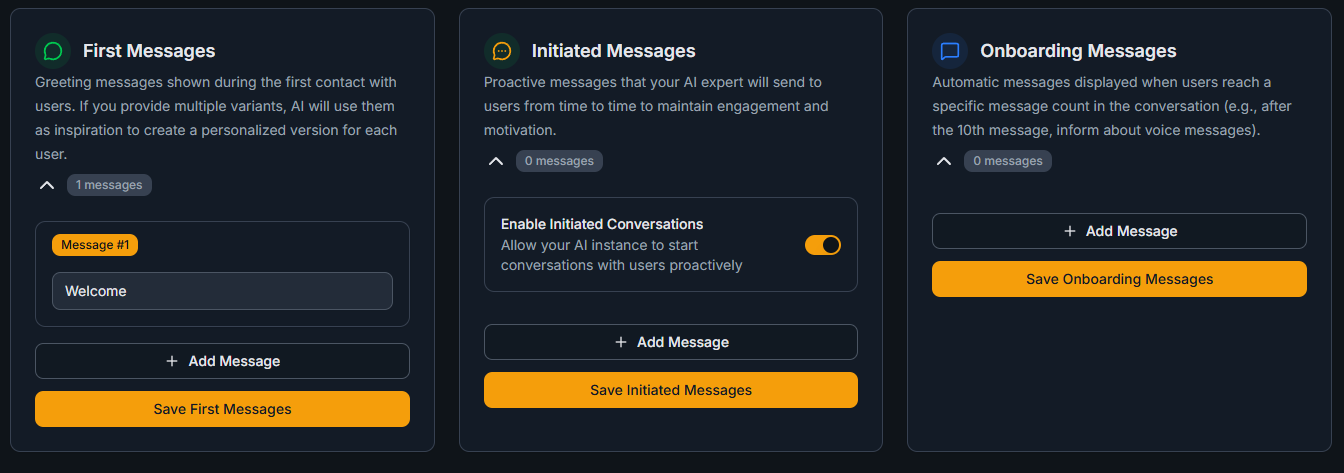
After every modification to the onboarding messages in the Dashboard, make sure to click the Save button. Changes saved through the Dashboard are applied directly. If you edit the onboarding.gdoc file on Google Drive instead, you must run the /update command in Telegram.
The Iterative Process: The Key to Success Is Repetition and Patience
Remember that testing and optimization isn't a one-time affair, but a cyclical, iterative process:
- 🧪 Test (yourself or with beta testers).
- 📊 Carefully analyze results and collect specific feedback.
- 🔧 Based on analysis, make targeted adjustments (System Prompt, know-how in sources, role definitions, onboarding).
- 🔁 Test again to verify the impact of your changes.
- 🔄 Repeat until you're truly satisfied with the behavior and quality of your AI Expert.
Be patient and systematic. Fine-tuning complex AI can take some time. The goal isn't to achieve 100% perfection (because AI is inherently probabilistic and constantly learning), but to reach a state where you and your testers are convinced that the AI provides high value and is ready for your real customers.